A1 Support

Support, always there when you need it.

We’ve got you covered. Whether you need help using the app, adjusting schedules, troubleshooting a section of lights, or requesting service, our team is here to make support simple and stress-free. Use the options below to get help fast—and know that we stand behind your system long after install day.

Quick Help Options

Start Here for the Fastest Fixes.

Most questions can be solved in just a few minutes with a quick reset, an app check, or a wiring/connection review.

Common quick fixes:

Check the breaker, switch, or outlet feeding the controller. Power interruptions are the most common cause of a sudden outage.
A quick refresh often resolves syncing issues and reconnects the system. If needed, log out and back in to reset the session.
Weak signal can cause delays or disconnects, especially on schedules. Moving your router or adding a mesh node can make a big difference.
Turning power off for 30–60 seconds and back on can clear minor glitches. This is a safe first step for most connectivity issues.
App Support

Smart Control App Support.

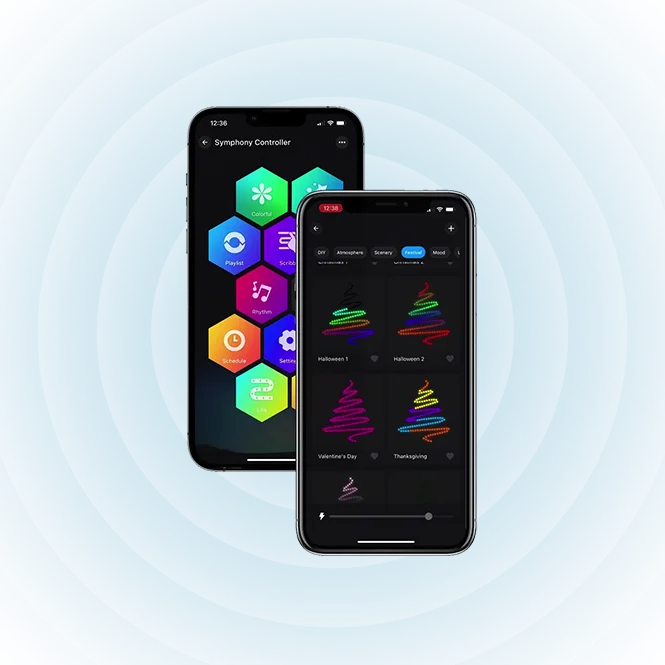
How It Works : Smart-Control Setup & Walkthrough

Manage your YearRound Lights system from anywhere with our companion app. Here are some support tips if needed. Please reach out to us with any questions or if you need help.

Getting Started

Download the YearRound Lights app from the App Store or Google Play, then follow the in-app pairing instructions to connect to your controller. Make sure your phone is on the same Wi-Fi network as the controller during initial setup.

Common App Issues

Confirm your home Wi-Fi is broadcasting on 2.4 GHz — most smart home devices don't support 5 GHz networks. Restart the app and controller, then try pairing again.
Check that your phone has an active internet connection. If the issue continues, log out and back in, or reinstall the app.
Your controller should reconnect automatically once power is restored. If it doesn't, briefly unplug the controller and plug it back in.

For step-by-step walkthroughs, we have a video tutorial page coming soon. In the meantime, from setup to trouble-shooting, we will be happy to help you with any Smart Control App issues you may have. Please contact us.

10/4 Warranty

Real Issues? We’ve Got You Covered.

Warranty Support

Every YearRoundLights installation is backed by our 10-year parts, 3-year labor limited warranty, covering defects in materials and workmanship under normal use.

What's Covered

Individual lights or sections that fail to illuminate due to manufacturing defects.
Malfunctions in the smart controller that prevent normal operation or app connectivity.
Internal failures of the power supply unit not caused by external damage or surges.

What's Not Covered

Damage resulting from unauthorized modifications, third-party repairs, or installation outside our guidelines.
Issues caused by conditions beyond the system's rated specifications, such as flooding or impact damage.
Minor cosmetic fading, discoloration, or aging that occurs through normal long-term use.

Filing a Warranty Claim

To start a claim, please have the following ready:
Your original order confirmation, receipt, or invoice showing the date and place of purchase.
Found on the controller unit or the back of the power supply, typically beginning with "LX-".
A clear summary of what's happening, when it started, and any troubleshooting steps you've already tried.
Photos or a short video showing the defect or behavior, which helps our team diagnose the problem faster.
Once you’ve gathered these, submit your claim through the warranty portal or email our support team directly. You’ll receive a confirmation with a case number within one business day.

What Happens Next

Our team will assess your submission and may follow up with a few diagnostic questions or remote troubleshooting steps.
Depending on the issue, we'll offer a repair, a replacement unit, or a refund of the affected component.
If a replacement is approved, we'll provide a prepaid return label and ship the new unit within 3–5 business days of receiving the defective product.
Help & Warranty Support

Still Have Questions?

Our support team is available Monday through Friday, 9 AM to 6 PM. Reach out anytime through the contact form below, or by emailing support — we typically respond within a few hours during business days.

Need Help?

If you have any questions or comments, please reach out here. You can also contact us here, or start a quote process here.

Error: Contact form not found.

Frequent Questions

More Information & Frequently Asked Questions

Need more info? Please take a look at our Frequent Questions section here, Contact Us here, or don’t hesitate to call us at 713-446-0495.

Cart (0 items)